
You ask ChatGPT for the best plumber, electrician or auto body shop near you, and your own business never shows up. The usual advice is to check robots.txt for blocked AI crawlers. We ran that check on 489 live local business websites in Orange County, California, and found the advice points at the wrong layer.
Robots.txt blocked an AI crawler on 4 of those sites. The firewall refused one on 68. Below is what we tested, what each bot does, and how to check your own site in about ten minutes.

Quick answer: AI crawlers are bots that AI companies send to read web pages for model training, search indexes or live answers. On the 489 local business sites we tested, robots.txt almost never blocked them (4 sites). The real blocker was the firewall or CDN: 13.9% refused at least one AI crawler request.
Not sure what your firewall is doing? We'll run the same AI crawler checks on your site and send you the results with a fix list, free. Get a free website and AI search audit.
What we tested
We started with 662 Orange County businesses that list a website in OpenStreetMap, with chains removed. We crawled them on September 25 and 26, 2026, and 489 homepages loaded. This is one slice of our larger Orange County local business website study, which also covers speed, calls and forms.
For each live site we read robots.txt and llms.txt. Then we requested the homepage like a normal phone browser, and right after that sent the same request three more times with the GPTBot, ClaudeBot and PerplexityBot user agents. If the browser request worked and the bot request didn't, something on the server side treats AI crawlers differently.
Two limits to keep in mind. We tested homepages only, and a user agent string is not the same as a real crawler coming from the AI company's own IP addresses. A firewall that checks IP ranges may treat the real bot better or worse than our test.
Which AI crawlers exist and what each one does

AI crawlers don't all do the same job, and that changes what blocking one costs you. Training bots collect pages for models that get built later. Search and answer bots fetch pages for what a customer sees in an assistant right now.
| Bot | Company | What it does | What blocking it costs you |
|---|---|---|---|
| GPTBot | OpenAI | Collects training data | Little; it doesn't control ChatGPT's live answers |
| OAI-SearchBot | OpenAI | Builds the ChatGPT search index | A lot; you can drop out of ChatGPT search results |
| ChatGPT-User | OpenAI | Fetches a page when a ChatGPT user asks for it | That answer breaks for the user who asked |
| ClaudeBot | Anthropic | Collects training data | Little for today's answers |
| PerplexityBot | Perplexity | Builds Perplexity's search index | A lot; you can drop out of Perplexity answers |
| Google-Extended | A robots.txt token for use in Gemini | Nothing for Google Search ranking | |
| CCBot | Common Crawl | Open web dataset many AI models train on | Little directly, but it feeds many models |
| Bytespider | ByteDance | Crawls for ByteDance's AI products | Usually little for a US local business |
OpenAI explains its three bots on its crawler overview page, and Google lists Google-Extended among its common crawlers. Perplexity documents PerplexityBot the same way.
"Blocking a training bot is a business choice. Blocking a search bot by accident is a lost customer you never hear about."
Finding 1: robots.txt almost never blocks AI crawlers
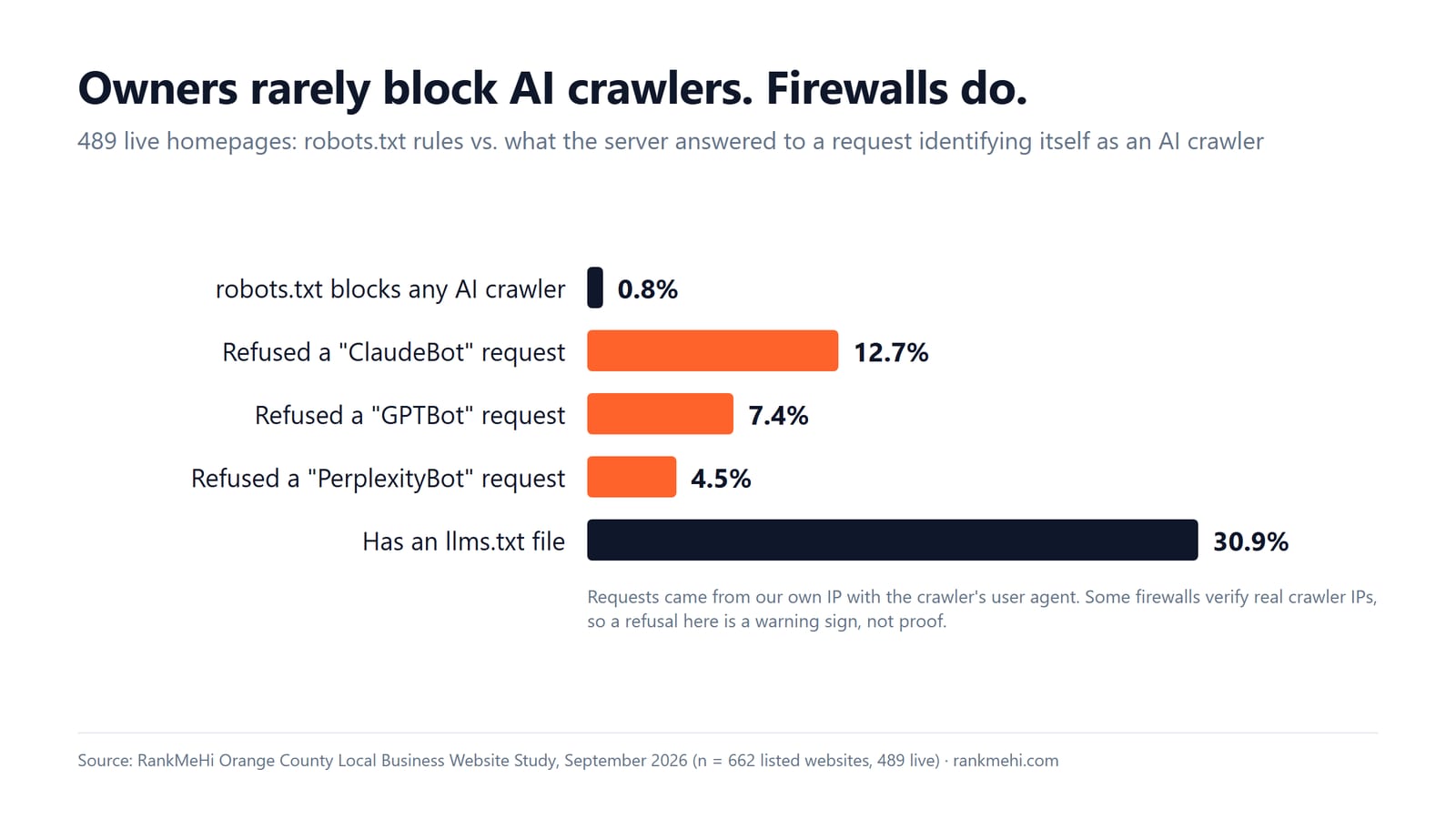
Robots.txt is not where local business sites shut out AI crawlers. Of 489 live homepages, 54 (11%) mention an AI crawler in robots.txt at all, and only 4 (0.8%) actually block one.
| robots.txt, 489 live homepages | Sites | Share |
|---|---|---|
| Names any AI crawler | 54 | 11% |
| Blocks any AI crawler | 4 | 0.8% |
| Blocks a search or answer bot | 3 | 0.6% |
| "User-agent: *" with "Disallow: /" (blocks every bot) | 6 | 1.2% |
The six sites with a blanket "Disallow: /" are a different problem. They tell every crawler to stay out, Google included, which usually means a staging setting someone forgot to remove.
The platform split is just as clear. WordPress blocked an AI crawler on 0 of 205 sites, Wix 0 of 38, Squarespace 0 of 31, GoDaddy's builder 0 of 31 and Shopify 0 of 17. Three of the four blocks sat on custom-built sites.
If your site runs on one of those platforms and nobody edited robots.txt by hand, it's very unlikely to be your problem.
Finding 2: firewalls refuse AI crawlers the owner never chose to block
The firewall is where AI crawlers actually get turned away. 68 of the 489 sites (13.9%) refused at least one AI crawler request, even though every one of them had answered a normal browser request a moment earlier.
| Refused by the server, 489 live homepages | Sites | Share |
|---|---|---|
| Refused the ClaudeBot user agent | 62 | 12.7% |
| Refused the GPTBot user agent | 36 | 7.4% |
| Refused the PerplexityBot user agent | 22 | 4.5% |
| Refused at least one of the three | 68 | 13.9% |
| Blocked AI crawlers either way (robots.txt or firewall) | 77 | 15.7% |
54% of the refusals came from sites behind Cloudflare. In July 2025 Cloudflare announced that it would block AI crawlers by default for new domains and let owners choose which ones to allow. From the outside we can't tell which setting each site uses, or whether someone picked it on purpose to stop scrapers.
What we can say is this: the block lives in a layer most owners never log into, and the standard advice ("check robots.txt") will tell them everything is fine.
Is your site in the 14%? We check the firewall response for each AI crawler as part of our AI search optimization work, and the first check is free. Ask for a free AI crawler check.
Finding 3: llms.txt is common, and mostly not written by the owner
llms.txt is a plain text file that summarizes a site for AI tools. We found one on 151 of the 489 sites (31%). Of the 76 files we could fingerprint, 72.5% were generated by a website builder or an SEO plugin, not written by a person.
| Platform | Sites with llms.txt |
|---|---|
| Wix | 31 of 38 |
| Shopify | 16 of 17 |
| WordPress | 49 of 205 |
No major AI company has said it uses llms.txt to rank or cite pages. So a file your builder created for you is not proof that AI crawlers can read your site. Check the firewall first; it's the layer that actually decides.
How to check if AI crawlers can read your website
You can check AI crawler access in about ten minutes, and most of the steps need no technical skill.

- Open yoursite.com/robots.txt in a browser. Look for GPTBot, OAI-SearchBot, ChatGPT-User, ClaudeBot, PerplexityBot, or a "Disallow: /" line under "User-agent: *".
- Compare a bot request with a browser request. Ask your developer or host to request your homepage with the GPTBot user agent and with a normal browser. A 403 or a challenge page for the bot and a normal page for the browser means a firewall rule is in the way.
- Check Cloudflare if you use it. Look at the AI crawler and bot settings and the security events log for blocked requests from AI crawler user agents.
- Check your host and plugins. Managed hosts and WordPress security plugins have their own bot rules; ask your host what they block.
- Make sure key facts are in the HTML. Services, service area, hours, phone and prices should be readable without JavaScript, because many crawlers don't run scripts.
- Decide per bot. Use the table above: search and answer bots affect today's answers, training bots don't.
- Recheck after every change. A new host, plugin or security setting can turn a block back on without telling you.
If step 2 sounds like work you'd rather hand off, that's normal. It's the same check our web development team runs before any site goes live.
Which AI crawlers a local business should allow
Allow the search and answer bots of every assistant your customers use: OAI-SearchBot, ChatGPT-User and PerplexityBot at minimum. Those bots decide whether your business can appear when someone asks an assistant who to call.
Training bots like GPTBot and ClaudeBot are a business choice. Blocking them doesn't remove you from today's answers. For a local service business, our view is that being known to these systems is worth more than keeping your homepage out of a training set, so we leave them open for our own clients.
Block a bot only when it hammers your server or offers you nothing back. Bytespider is the usual candidate for a US local business.
If you want the bigger picture of how assistants choose which businesses to mention, our guides to AI SEO for local businesses and generative engine optimization cover what comes after access.
What RankMeHi does about AI crawlers
We check AI crawler access the same way we did for these 489 sites: robots.txt, the firewall response for each AI crawler, schema, page speed and whether the facts an assistant would repeat about your business are in the page's HTML.
| Service | Price | Timeframe |
|---|---|---|
| AI readiness sprint | from $390 | under a week |
| Audit and fix | from $490 | 1 to 2 weeks |
| New website | from $2,490 | 3 to 6 weeks |
When the problem is the site itself (slow, hard to read, facts buried in images), a rebuild through our web design service is often cheaper than patching it.
Key takeaways
- Robots.txt blocked AI crawlers on 4 of 489 local business sites (0.8%). It's rarely the reason a business is missing from AI answers.
- Firewalls refused at least one AI crawler on 68 sites (13.9%), all of which loaded fine for a normal browser.
- 54% of those refusals came from sites behind Cloudflare, which blocks AI crawlers by default for new domains since July 2025.
- Search and answer bots (OAI-SearchBot, ChatGPT-User, PerplexityBot) matter for today's answers; training bots (GPTBot, ClaudeBot) don't.
- llms.txt was on 31% of sites, mostly generated by builders and plugins, and no major AI company says it uses the file.
FAQ
What are AI crawlers?
AI crawlers are bots that AI companies send to read web pages. Some collect training data for future models (GPTBot, ClaudeBot), some build search indexes for assistants (OAI-SearchBot, PerplexityBot), and some fetch a page live when a user asks about it (ChatGPT-User). Each one identifies itself with its own user agent.
Should I block GPTBot?
GPTBot collects training data for OpenAI and does not control whether your business appears in ChatGPT's live search answers; OAI-SearchBot does that. Blocking GPTBot mostly opts your pages out of future training. For most local businesses there is little reason to block it.
Does blocking AI crawlers hurt Google rankings?
No. Blocking GPTBot, ClaudeBot or PerplexityBot does not change how Googlebot crawls or ranks your site. Google-Extended, Google's own AI token, only controls use in Gemini and does not affect Google Search. A blanket "Disallow: /" in robots.txt is different: it blocks Googlebot too.
What is OAI-SearchBot?
OAI-SearchBot is the crawler OpenAI uses to build the index behind ChatGPT search. If your robots.txt or firewall blocks it, your pages may not appear as sources in ChatGPT search answers. It is separate from GPTBot, so you can allow one and block the other.
Does llms.txt help my business show up in ChatGPT?
No major AI company has said it uses llms.txt to rank or cite pages. In our study 31% of local business sites had one, mostly created by a builder or plugin. It does no harm, but making sure AI crawlers aren't refused at the firewall matters far more.
Find out what your firewall tells AI crawlers
Most owners have never seen how their site answers a bot, and nothing in their dashboard tells them. We'll send GPTBot, ClaudeBot and PerplexityBot requests to your homepage, check robots.txt and your key pages, and tell you plainly what's blocked and whether it matters.
Want the same check we ran on 489 sites? It's free and takes us a day. Get your free AI crawler and website audit.
Services mentioned in this article
RankMeHi designs and builds business websites, then makes sure they are found and convert. Start with the two pages below.